Vehicle page
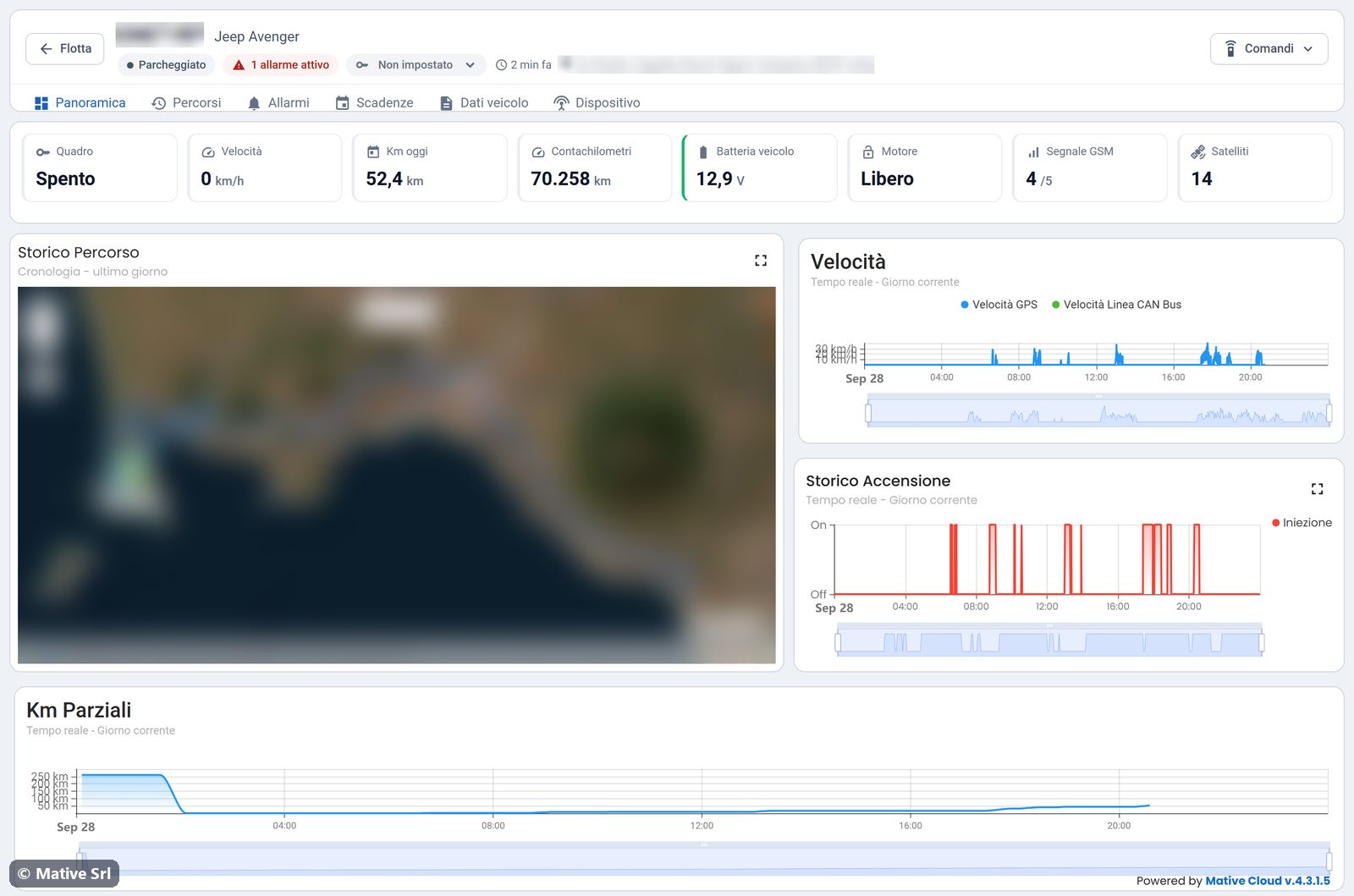
The vehicle page collects everything about one vehicle. You open it by clicking the plate in the fleet list, or Scheda on the map card or in an alarm. The first tab is Panoramica (overview).
Header
The header stays at the top of every tab.
- ← Flotta goes back to the fleet home.
- Plate and model of the vehicle.
- Status of the vehicle (see the statuses). With open alarms, the red chip N allarmi attivi opens the Allarmi tab.
- Rental status: the drop-down menu sets Libero, Noleggiato, Prenotato, In manutenzione or Fuori servizio. The change is saved immediately, and its history feeds the occupancy KPI in the statistics.
- Time of the last data and last address.
- Comandi (commands): the remote commands available for the vehicle.
caution
The rental status is saved as soon as you choose a value: there is no confirm button.
Tabs
| Tab | Content |
|---|---|
| Panoramica | Live values, route of the last day, charts |
| Percorsi | Trips and replay |
| Allarmi | Alarms of the vehicle |
| Scadenze | Deadlines |
| Dati veicolo | Vehicle record |
| Dispositivo | Tracker, geofences and battery health |
Live values
Each tile appears only when the tracker sends that value, so vehicles with different trackers show different tiles.
| Tile | Value |
|---|---|
| Quadro | Ignition on (Acceso) or off (Spento) |
| Velocità | Current speed, highlighted above 130 km/h |
| Km oggi | Km driven since midnight |
| Contachilometri | Odometer. Hover to see the km at installation and the km driven with the tracker. |
| Batteria veicolo | Vehicle battery voltage: amber below 12.2 V, red below 11.8 V |
| Carburante | Fuel level, when available |
| Motore | Engine free (Libero) or locked (Bloccato) |
| Porte | Door status, on vehicles connected through the CAN bus |
| Temp. motore | Engine temperature, when available |
| Segnale GSM | Mobile signal, from 0 to 5 |
| Satelliti | GPS satellites in view |
Map and charts
- Storico Percorso (route history): the route of the last day and the last position. The Replay button opens the replay of the route.
- Velocità: speed of the day, from GPS and, where available, from the CAN bus.
- Storico Accensione (ignition history): when the engine was on during the day.
- Km Parziali (partial km): km driven during the day.
Use the icon at the top right of each widget to open it full screen. The bar under the charts zooms into a part of the day.